
IMG2SVG
Tool for converting raster images to SVG with smart preprocessing.

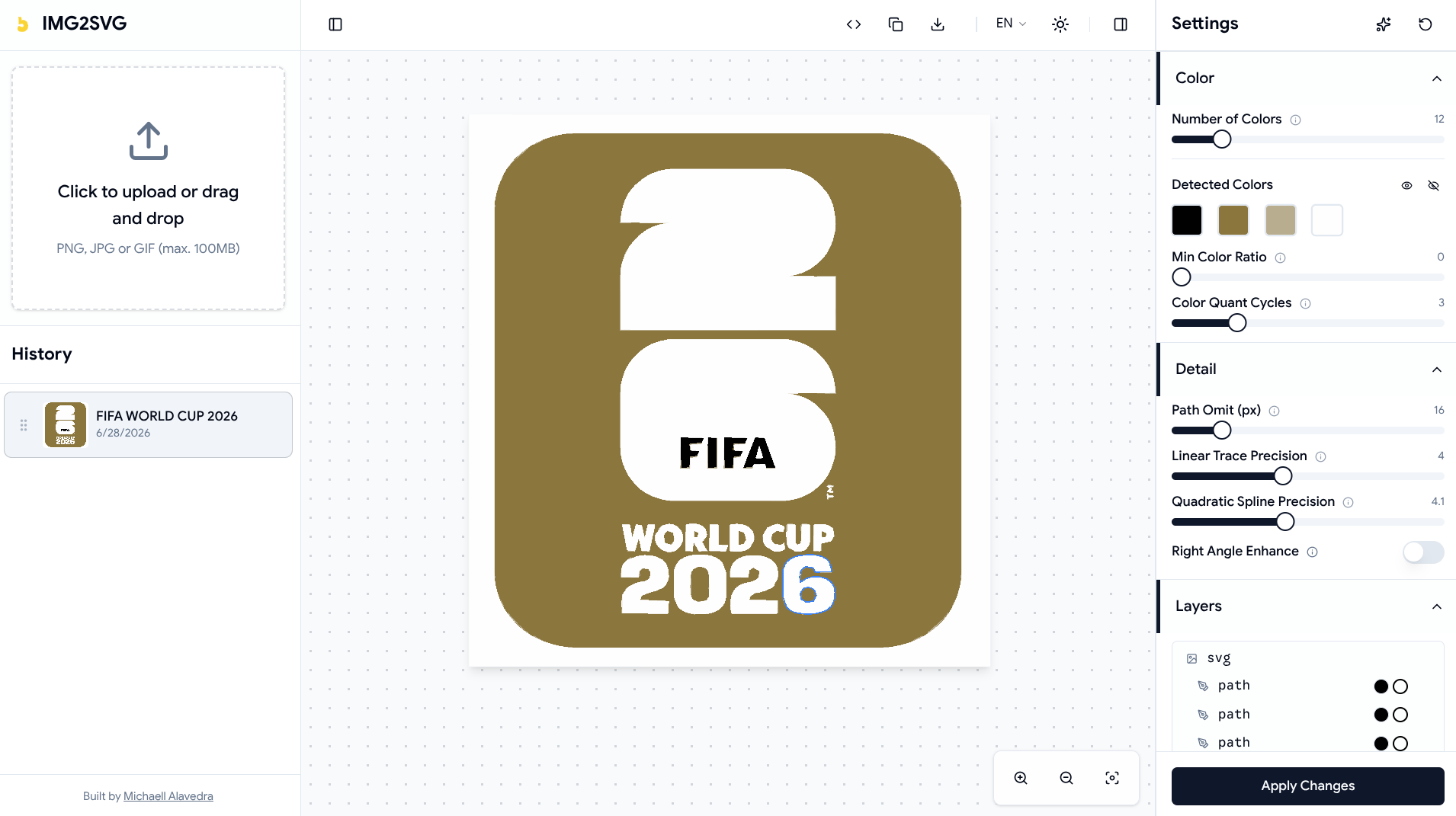
The purpose of this document is to provide a comprehensive breakdown of IMG2SVG, a system designed for the advanced conversion of raster images into scalable SVG vectors. It details the motivations, structural design, and technical decisions underpinning the application’s operation.
1. Utility and General Operation
The Problem
Digitizing graphics often involves dealing with raster images (bitmaps) that suffer from pixelation and noise, limiting their utility in high-resolution media or pure graphic design. Conventional vectorization requires heavy desktop tools or cloud services that can compromise privacy or immediacy. Furthermore, source images are frequently grainy, resulting in vectorized outputs with thousands of unnecessary paths that degrade rendering performance.
The Operational Solution
I designed IMG2SVG as a Local-First tool focused on resolving the transition from raster to vector immediately and privately within the web browser.
The main workflow is straightforward:
- Upload and Selection: The user provides a raster image via an upload panel or by selecting a previously stored local file.
- Preprocessing: Before attempting to trace the vectors, the system applies configurable filters (Box Blur, median filtering, or K-Means quantization). This stabilizes noise and simplifies the structure of the original image.
- Vectorization: The image is traced and converted into mathematical instructions (SVG). The entire resource-intensive calculation process is abstracted from the main interface to prevent operational blockages.
- Visual Iteration: The user manipulates settings and applies changes. The tool locally persists both the result and the configuration used, allowing the exact work to be restored in subsequent sessions.
2. General Architecture and Structural Patterns
To ensure optimal performance and maintain decoupling between the computational core and the view, I structured the project based on a clear separation of concerns with a focus on progressive web applications (PWA) oriented towards intensive processing.
”Local-First” Model and Computational Offloading
The business logic demands CPU-bound processing on the client side. Therefore, I fully delegated the pixel preprocessing and vectorization layers to Web Workers.
graph TD
    UI[UI and State Layer] -->|Sends data and parameters| Worker[Web Worker: imageTracerJS + Preprocessing]
    Worker -->|Returns SVG string| UI
    UI <-->|Reads / Persists| IDB[(IndexedDB)]
This design prevents expensive operations, such as computing K-Means centroids or tracing vector paths, from blocking the Main Thread, thereby guaranteeing a permanently fluid user interface.
3. Data Modeling and State Logic
The application state is split into two primary dimensions: volatile memory for real-time interaction and persistent memory for long-term storage.
Persistent Storage
I use IndexedDB to store local entities without relying on an external backend. I defined a main entity, ImageRecord, which stores not only the original binaries and generated SVGs, but also the exact settings used.
erDiagram
    ImageRecord {
        number id PK
        string name
        Blob originalBlob
        string previewUrl
        string svgContent
        number createdAt
        number updatedAt
        Object settings
    }
Reactive State Management
The ephemeral and global state of the user interface is managed via a single immutable state tree (implemented with Zustand).
classDiagram
    class AppState {
        +number currentImageId
        +boolean processing
        +number progress
        +VectorizerSettings settings
        +String[] detectedColors
        +String[] hiddenColors
        +setCurrentImageId(id)
        +setProcessing(bool)
        +updateSettings(settings)
    }
    class VectorizerSettings {
        +number ltres
        +number qtres
        +number preprocessBlur
        +number preprocessQuantize
        +...
    }
    AppState *-- VectorizerSettings
This separation allows me to easily rehydrate the application by loading an ImageRecord from the database and applying its settings directly to the AppState, restoring the user session precisely.
4. Technology Stack
The selection of technologies addresses the need to balance high-level performance with a maintainable, strongly-typed architecture.
| Technology | Architectural Role | Technical Justification |
|---|---|---|
| Astro | Routing framework and core structure. | Enables static site generation with an island architecture, reducing Main Thread JavaScript load and enabling native PWA (@vite-pwa/astro). |
| React | Interactive UI construction (Components). | Implemented as islands (client:only="react") to govern only the complex dynamic logic of vectorization and visual iteration. |
| Zustand | Ephemeral global state management. | Provides an ultra-lightweight pub/sub mechanism that avoids unnecessary re-renders associated with the Context API. |
| Dexie.js | Persistence layer (IndexedDB wrapper). | Simplifies async transactions and facilitates compound indices for robust blob storage in the browser. |
| Web Workers | Computational thread isolation. | Offloads image preprocessing (Median Filter, K-Means) and the invocation of imagetracerjs to free the Main Thread. |
| Tailwind CSS | Utility-based design system. | Keeps CSS visually coupled to components without increasing cognitive load in external files, ensuring Dark Mode support. |
| Biome.js | Unified linter and formatter. | Replaces the traditional ESLint/Prettier pipeline, providing a faster static analysis (Rust-based) for TypeScript code. |
Closing
The architecture implemented in IMG2SVG demonstrates that the modern web ecosystem is capable of supporting applications traditionally tied to desktop resources or heavy client-server architectures. By leveraging Web Workers to offload computational tasks and using IndexedDB to build a resilient local-first experience, the system guarantees privacy, performance, and determinism. Encapsulating state through Zustand and dynamically segmenting processes turns a series of intensive mathematical tasks into a fluid and reliable interactive workflow for vector manipulation.